
How to configure TOU scheduling on a hybrid inverter
Most Nigerian hybrid system owners are paying more for energy than they need to.
Not because their system is undersized. Not because their solar array is too small. Because they are not using the one feature that turns a hybrid system from a passive backup device into an active energy cost management tool: time-of-use scheduling.
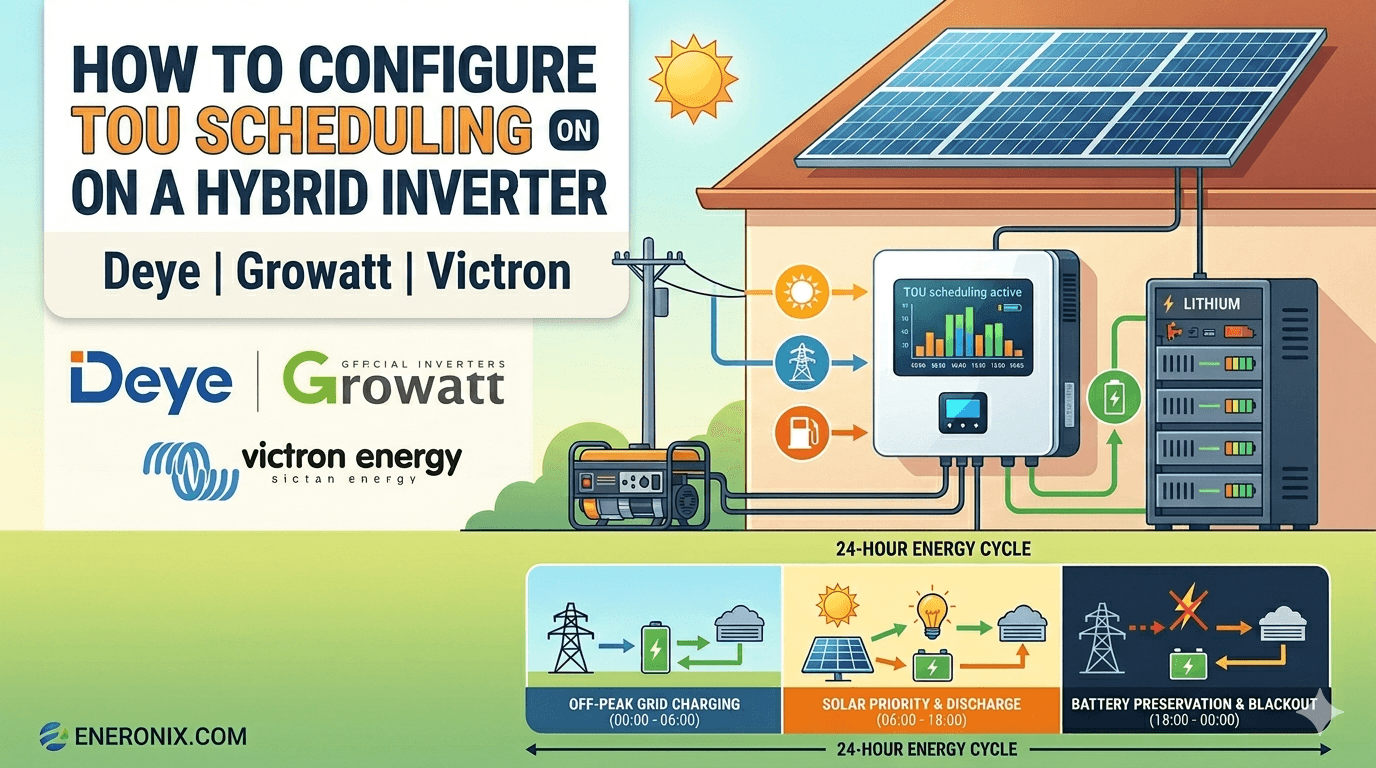
TOU scheduling tells your hybrid inverter exactly when to charge the battery, when to discharge it, how much power to draw from the grid, and when to restrict grid import. It is the difference between a system that reacts to energy conditions and one that anticipates them.
TOU scheduling has three specific applications that save real money:
- Off-peak grid charging: charge the battery from the grid during cheap overnight hours, discharge during expensive daytime hours
- Battery preservation windows: tell the inverter not to discharge the battery during certain hours so it is fully charged for an anticipated blackout period
- Generator optimisation: restrict generator input to specific hours to control fuel consumption and protect the battery from overcharge
This article covers the exact TOU configuration for Deye, Growatt, and Victron for each of these three Nigerian applications.
What TOU Scheduling Actually Does

Before configuring anything, understand the mechanism.
TOU scheduling divides the 24-hour day into time windows. For each window, you define three things:
1. Battery SOC target:
The minimum or target SOC the battery should reach or maintain during this window. The inverter will charge from solar or grid to reach this target if the battery is below it.
2. Grid charge permission:
Whether the inverter is allowed to charge the battery from the grid during this window. If checked and the battery is below the SOC target, the inverter draws from the grid to charge. If unchecked, only solar charges the battery.
3. Discharge permission and depth:
Whether the battery is allowed to discharge during this window, and to what SOC floor. If discharge is restricted, the grid powers loads instead, preserving battery charge for a later period.
The interaction between these three parameters across all time windows defines your system’s complete daily energy behaviour.
Deye hybrid inverters support 6 time periods for battery charging and discharging. Growatt supports 2 AC charging windows. Victron supports 5 scheduled charge periods in the ESS menu.
One critical point most Nigerian installers miss: on Deye, even with Load First selected, the battery will not discharge to power loads when the grid is present unless Time of Use is checked and active. Always verify the TOU checkbox is enabled before leaving the configuration screen.
TOU Application 1: Off-Peak Grid Charging
This is the most financially impactful TOU application for Nigerian hybrid system owners.
The concept: charge the battery from the grid during cheap overnight hours and discharge it during expensive daytime hours or peak-load periods. If your DISCO supply is more reliable overnight, and your overnight tariff is lower than daytime, this directly reduces your energy cost.
The condition for this to work: your overnight grid supply must be both available and at a lower effective cost than daytime supply. Verify this for your specific location and DISCO before configuring off-peak grid charging.
Deye TOU Configuration for Off-Peak Grid Charging

Go to: System Work Mode > Time of Use
Enable: Check the Time of Use checkbox.
Configure the six time slots as follows:
| Slot | Time Period | SOC Target | Grid Charge | Purpose |
| 1 | 00:00 to 06:00 | 90% | Checked | Off-peak grid charge window |
| 2 | 06:00 to 07:00 | 20% | Unchecked | Transition: solar taking over |
| 3 | 07:00 to 18:00 | 20% | Unchecked | Solar priority discharge |
| 4 | 18:00 to 20:00 | 20% | Unchecked | Evening discharge |
| 5 | 20:00 to 22:00 | 20% | Unchecked | Night discharge continues |
| 6 | 22:00 to 00:00 | 20% | Unchecked | Discharge until grid charge window |
What this does: from midnight to 6am, the inverter charges the battery from the grid to 90% SOC. From 6am onwards, the battery discharges normally with solar supplementing. The battery enters the evening at a higher SOC than it would without grid charging, providing extended overnight backup.
| Important Deye-specific note: the SOC target in the TOU table is both the charge target AND the minimum discharge floor for that window. Setting Slot 1 to 90% means the system charges to 90% during that window but will not discharge below 90% during that same window. This is by design. The battery is being preserved for the coming day. |
Maximum grid charge current on Deye: Go to Battery Setup > Max A Charge. Set this to a value your grid meter can supply without tripping. For a typical Nigerian 5kVA meter, maximum safe charge current is approximately 15A. Set Max A Charge to 15A during the off-peak window.
Growatt TOU Configuration for Off-Peak Grid Charging

Go to: Settings > AC Charging Time
- AC Charging Time 1 Start: 00:00
- AC Charging Time 1 End: 06:00
- Charging SOC Upper Limit: 90%
Go to: Settings > Charger Source Priority
During the off-peak window: set to Solar and Utility. Outside the off-peak window: set to Solar First.
Growatt supports two configurable charging windows (AC Charging Time 1 and AC Charging Time 2). Configure both if your off-peak window is split across two periods.
Victron TOU Configuration for Off-Peak Grid Charging

In the GX device: Go to Settings > ESS > Scheduled Charge Levels
Add a schedule:
- Start time: 00:00
- Duration: 6 hours
- SOC limit: 90%
- Self-consumption above limit: Unchecked (allow discharge above 90% after the window ends)
Charging will stop automatically when the battery reaches the 90% SOC limit. For Victron, up to five scheduled charge windows are available, providing more granularity than Growatt’s two-window system.
TOU Application 2: Battery Preservation Windows
This is the most Nigeria-specific TOU application. It solves a real problem that most Nigerian hybrid system owners experience but do not know how to fix.
The problem:
your battery discharges normally during the evening. By 10pm it is at 40% SOC. NEPA fails at midnight and stays off until 8am. The battery covers some of that period but depletes before sunrise. You have no power from 3am to 7am.
The solution:
configure a battery preservation window from 10pm to midnight that prevents the battery from discharging below 80% SOC during those two hours. The grid powers loads during that window. The battery enters the blackout at 80% SOC instead of 40% SOC. It now covers the full overnight blackout until solar kicks in at 7am.
Deye Battery Preservation Configuration
In the TOU table, set the evening preservation window:
| Slot | Time Period | SOC Target | Grid Charge | Purpose |
| 1 | 00:00 to 06:00 | 20% | Unchecked | Normal overnight discharge |
| 2 | 06:00 to 18:00 | 20% | Unchecked | Solar priority discharge |
| 3 | 18:00 to 20:00 | 20% | Unchecked | Early evening discharge |
| 4 | 20:00 to 22:00 | 80% | Unchecked | Preservation window starts |
| 5 | 22:00 to 24:00 | 80% | Unchecked | Grid powers loads, battery preserved |
| 6 | (unused) |
What this does: from 8pm to midnight, the SOC target is 80%. The inverter will not discharge the battery below 80% during this window. The grid powers loads instead. The battery enters midnight at 80% or above, fully prepared for an anticipated blackout.
Adjust the preservation window based on your NEPA pattern. If NEPA typically fails at 11pm in your area, set the preservation window from 9pm to 11pm. If it typically fails at 2am, shift the window accordingly.
Growatt Battery Preservation Configuration

Growatt does not have a native discharge restriction per time window in the same way Deye does. The closest approximation is adjusting the Battery Stop Discharging SOC setting combined with Output Priority scheduling.
Go to: Settings > Battery Stop Discharging Voltage (or SOC)
Set to: 80% SOC for the preservation period. The limitation with Growatt is that this applies globally, not per time window. For most Nigerian Growatt users, the practical approach is to set a slightly higher global discharge floor (30 to 40% SOC instead of 20%) to maintain a buffer without needing time-window-specific configuration.
Victron Battery Preservation Configuration
Victron handles this elegantly through the ESS scheduled charge levels combined with the Self-consumption above limit parameter.
In the GX device: Settings > ESS > Scheduled Charge Levels
- Start time: 20:00
- Duration: 4 hours
- SOC limit: 80%
- Self-consumption above limit: Set to PV only
During this 4-hour window, the battery is not discharged. Solar (if any evening production remains) powers loads. Grid covers the rest. Battery enters midnight at 80% or above SOC.
TOU Application 3: Generator Optimisation
For Nigerian hybrid systems where a generator is connected to the AC input port, TOU scheduling allows you to restrict generator charging to specific windows and prevent the inverter from drawing more than the generator can safely deliver.
The scenario: your generator runs from 10pm to midnight on nights when NEPA is absent. You want the hybrid inverter to charge the battery aggressively during those 2 hours, then stop drawing from the generator.
Deye Generator TOU Configuration
| Slot | Time Period | SOC Target | Grid Charge | Purpose |
| 1 | 22:00 to 00:00 | 80% | Checked | Generator charging window |
| 2 | 00:00 to 06:00 | 20% | Unchecked | Battery discharge, generator off |
Additional setting: Go to Grid Setup > AC Input Current Limit
| AC input limit (A) = (Generator kVA x 1000 x 0.8) / 230V For a 3.5kVA generator: (3500 x 0.8) / 230 = 12.2A. Set to 12A. This prevents the inverter from drawing more from the generator than it can supply, which would cause overload, frequency drop, and inverter AC input protection tripping. |
Read our generator sizing guide for the full AC input current limit methodology including PowerAssist configuration for Victron systems.
Victron Generator TOU Configuration
In the GX device: Go to Settings > ESS > Scheduled Charge Levels
- Start time: 22:00
- Duration: 2 hours
- SOC limit: 80%
Set AC Input Current Limit in VEConfigure to the generator’s rated current. The Victron PowerAssist feature actively manages the generator load to prevent overload, which is a significant advantage over the simpler Deye and Growatt current limiting.
Peak Shaving
Peak shaving limits the maximum power drawn from the grid at any moment. When your load spikes above the peak shaving threshold, the battery supplements the difference. This prevents expensive demand charges and protects against meter tripping.
Deye Peak Shaving Configuration
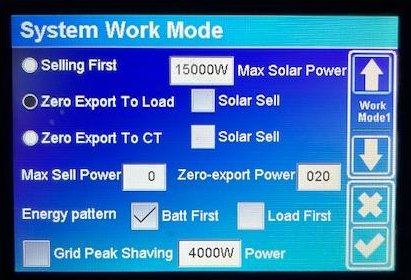
Go to: System Work Mode > Grid Peak-Shaving
Enable: Check Grid Peak-shaving
Set the peak shaving power limit. For a home with a 5kVA NEPA meter:
- Meter maximum: 5,000VA at 230V = 21.7A
- Set peak shaving to: 3,500W (80% of meter rating)
When load demand exceeds 3,500W, the battery supplements the grid input automatically. The grid never exceeds 3,500W. Your meter breaker never trips.
Critical Deye note: if you have Solar Sell enabled and want TOU discharge for export, disable Peak Shaving first. Peak Shaving and Solar Sell active simultaneously can prevent TOU discharge from working on some Deye firmware versions. For most Nigerian installations without net metering, do not run Peak Shaving and Solar Sell simultaneously.
Victron Peak Shaving Configuration

In VEConfigure: Go to Inverter/Charger > AC Input Current Limit
Set the current limit to your meter’s maximum. The Multiplus-II will PowerAssist automatically when load exceeds this limit, drawing from the battery to supplement the grid. This is Victron’s native peak shaving mechanism and requires no separate Peak Shaving toggle.
Verifying Your TOU Configuration Is Working
After configuring TOU settings, verify they are active through the monitoring platform.
On Deye (SolarmanPro or Local Display)
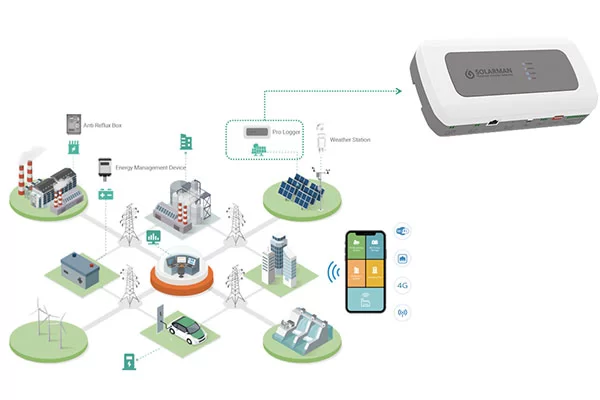
- Check that the TOU checkbox is active on the System Work Mode screen
- Monitor the battery SOC during the configured charge window. It should be rising from grid input, not just from solar
- During discharge windows, verify the inverter is drawing from battery and not importing from grid for loads within the battery’s capacity
On Growatt (ShineServer App)
- Check the inverter mode displayed in the app. During the AC charging window it should show grid charging active
- Monitor grid import during the off-peak window. It should show positive grid import if battery is below the charge target
On Victron (VRM Portal)
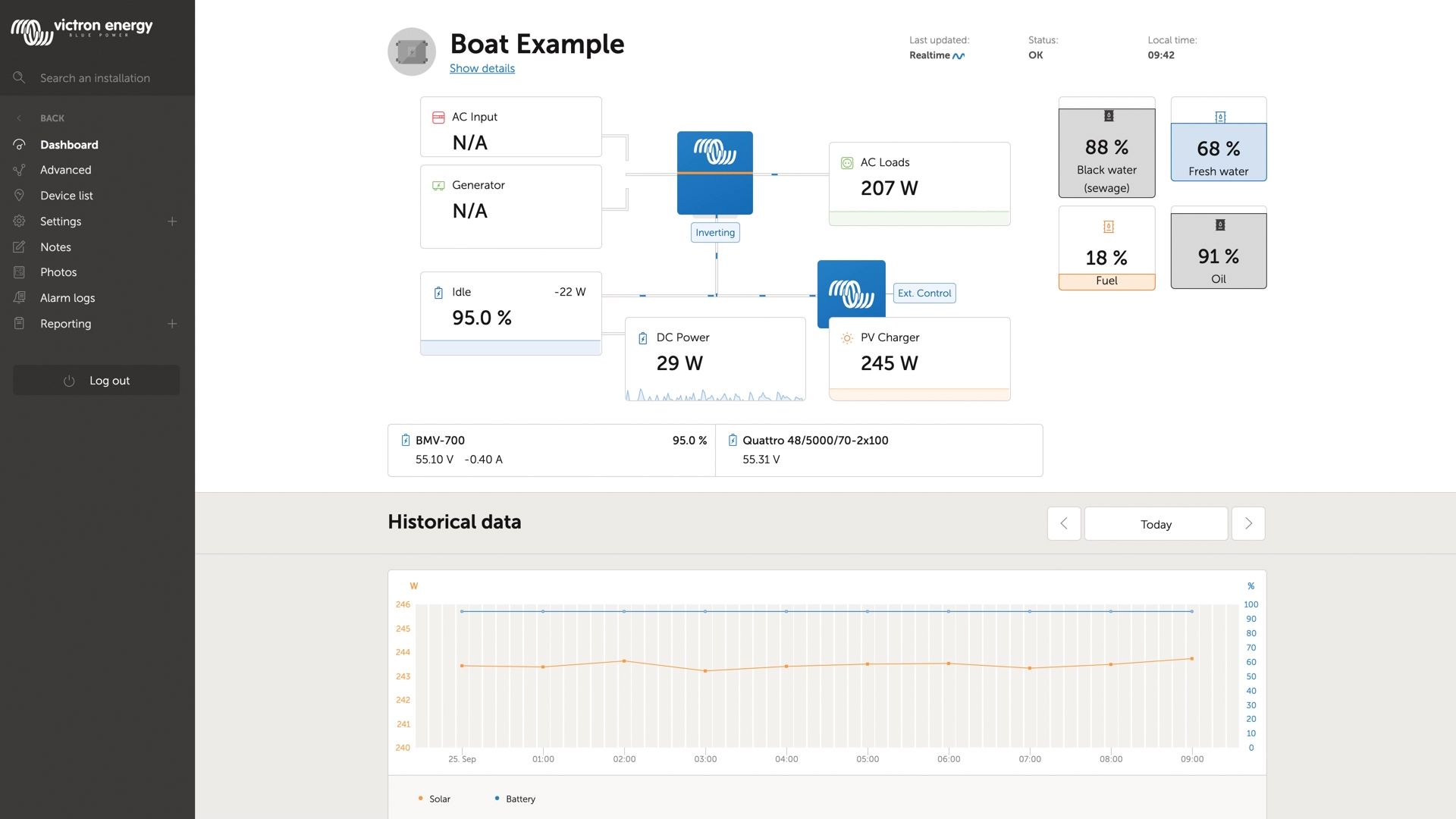
- Go to the VRM dashboard and check the scheduled charge status
- The ESS reason code on the Advanced tab shows the current operating mode. During a scheduled charge window it shows Charge from grid or Scheduled charge active
- The battery SOC graph should show a charge slope during the configured window
The Four TOU Configuration Mistakes to Avoid
Mistake 1: Grid Charge Checked for All 24 Hours
Result: the inverter draws from the grid to charge the battery all day and all night. Your NEPA consumption is higher than before the solar system was installed. Grid Charge should be checked only during the specific off-peak hours when cheap grid charging is the explicit goal.
Mistake 2: All SOC Targets Set to 100%
Result: the battery never discharges during any TOU window because the SOC target is 100% and the battery cannot exceed 100%. The system draws from the grid to power loads permanently. Set SOC targets to 20% during windows where normal discharge is desired.
Mistake 3: Time of Use Checkbox Not Checked on Deye
Result: none of the TOU settings apply. The inverter ignores all configured slots. Always verify the Time of Use checkbox is checked before leaving the configuration screen.
Mistake 4: Generator Charge Window Set Without AC Input Current Limit
Result: the inverter draws maximum charging current from the generator simultaneously with powering loads. Total AC input current exceeds the generator’s rated output. Generator overloads. Frequency drops. Inverter AC input protection trips. Always set AC input current limit before configuring any grid or generator charge window.
Frequently Asked Questions
What is TOU scheduling on a hybrid inverter?
TOU (time-of-use) scheduling divides the 24-hour day into time windows and assigns battery charge and discharge behaviour to each window. You define when the battery should charge from solar or grid, when it should discharge, and how deep the discharge should go in each window. This allows the inverter to exploit cheap overnight tariff rates, preserve battery charge for anticipated blackout periods, and restrict generator input to specific hours.
Does TOU scheduling work in Nigeria where tariffs are not time-differentiated?
Yes, for two of the three applications in this article. Off-peak grid charging requires time-differentiated tariffs to be financially useful. Battery preservation windows and generator optimisation work regardless of tariff structure and are directly applicable to Nigerian conditions today. Even without cheap off-peak tariffs, configuring preservation windows to protect battery SOC before anticipated blackouts delivers real backup benefit.
Why is my Deye inverter not following the TOU schedule I set?
The most common cause is the Time of Use checkbox not being checked on the System Work Mode screen. On Deye, the TOU slots are visible and configurable even when TOU is disabled. The settings appear to be saved but have no effect. Check the checkbox and verify the screen shows TOU as active. The second common cause is Peak Shaving being enabled simultaneously, which can override TOU discharge behaviour on some Deye firmware versions.
How many TOU time slots does each brand support?
Deye: 6 slots covering 24 hours. Growatt: 2 AC charging windows plus output priority scheduling. Victron: 5 scheduled charge periods in the ESS menu. For most Nigerian applications, Deye’s 6-slot system provides the most granularity for complex scheduling.
Can I configure TOU scheduling from my phone without accessing the inverter directly?
Yes. Deye settings can be configured remotely through the SolarmanPro app. Growatt settings can be adjusted remotely through the ShineServer app. Victron settings can be modified through the VRM portal remote console feature. All three platforms allow parameter changes without physical access to the inverter.
Should I enable grid charging via TOU if NEPA supply is unreliable overnight?
Only if your overnight NEPA supply is sufficiently reliable to actually complete the charge cycle. If NEPA fails at 1am during your midnight to 6am charge window, the charge cycle stops and the battery does not reach the target SOC. In locations with very unpredictable overnight supply, battery preservation windows are more useful than off-peak grid charging because they do not depend on grid availability to deliver their benefit.
What is peak shaving and do I need it for a Nigerian home?
Peak shaving limits the maximum power drawn from the grid at any moment and uses the battery to cover demand above that limit. For Nigerian homes, it prevents the NEPA meter breaker from tripping when multiple high-draw appliances start simultaneously. If your meter trips frequently under load, enable peak shaving and set the threshold to 80% of your meter’s rated capacity.
Conclusion
TOU scheduling transforms a hybrid system from a reactive backup device into an active energy management tool. In the Nigerian context, the three applications that matter most are: off-peak grid charging for locations with reliable overnight NEPA supply, battery preservation windows for locations where blackouts follow predictable patterns, and generator optimisation to protect both the generator and battery during scheduled charge events.
The configuration is not complex. Deye uses six time slots with SOC targets and grid charge checkboxes. Growatt uses AC charging time windows and charger priority settings. Victron uses scheduled charge levels in the ESS menu with SOC limits and self-consumption parameters.
Get the Time of Use checkbox checked on Deye. Set grid charge to checked only during the specific windows you want grid charging. Set SOC targets to 20% during normal discharge windows. Set the AC input current limit before configuring any generator charge window. Verify through the monitoring app that the schedule is active.
For the full priority settings configuration that TOU scheduling builds on top of, read our article on how to set solar priority, grid priority and battery priority on a hybrid inverter.
For the complete hybrid system design framework, read our complete hybrid solar system design guide.
| A hybrid system without TOU configuration is a system running on default settings. Default settings were not designed for Nigerian grid conditions. Configure TOU and let the system work for you. |

I am Engr. Ubokobong Ekpenyong, a solar specialist and lithium battery systems engineer with over five years of hands-on experience designing, assembling, and commissioning off-grid solar and energy storage systems. My work focuses on lithium battery pack architecture, BMS configuration, and system reliability in off-grid and high-demand environments.