
Most hybrid solar systems are wired correctly and configured wrong.
The cables are right. The battery is connected. The panels are producing. But the inverter is drawing from the grid at noon in full sun, or the battery is sitting at 100% while the grid powers the loads, or the system is importing grid power to charge the battery at the same time solar is clipping.
Every one of these problems comes from the same place: priority settings that were never configured correctly at commissioning.
Hybrid inverter Priority settings are the instructions you give the inverter about which source to use first, when to switch to a backup source, and at what battery SOC to stop discharging. They determine how the inverter behaves every second of every day. Getting them right is the difference between a system that works intelligently and one that destroys your battery and wastes your solar generation.
This article covers the exact settings for the four brands most common in Nigeria: Deye, Growatt, Victron, and Felicity. For each brand we give you the correct configuration for Nigerian conditions and explain exactly what each setting does.
What Hybrid inverter Priority Settings Actually Control
Before touching any setting, understand what you are actually controlling.
A hybrid inverter has three power sources it can draw from: solar (PV), battery, and grid. It has one output: your loads. At any given moment, the inverter must decide which source or combination of sources powers your loads and charges your battery.
Priority settings define the decision logic for that choice. They answer three questions:
Question 1: When solar is producing, what does the inverter do with it first?
Option A:
Power the loads first, then charge the battery with surplus (Load First).
Option B:
Charge the battery first, then power the loads from battery (Battery First).
Option C:
Power loads, charge battery, export surplus to grid (Selling First / SBU).
Question 2: When solar is insufficient or absent, what source fills the gap?
Option A:
Battery first, grid as backup when battery hits low SOC threshold.
Option B:
Grid first, battery only used during grid failure.
Question 3: At what battery SOC does the inverter stop discharging and switch to grid?
For LiFePO4 in Nigeria: 20% SOC. Not 0%. Not 50%.
For a Nigerian home with partial DISCO supply, the correct answers are:
- Question 1: Load First (power loads from solar, charge battery with surplus)
- Question 2: Battery first, grid as backup at 20% SOC
- Question 3: 20% SOC low threshold
This is the Solar-Battery-Grid (SBU equivalent) configuration. It maximises solar self-consumption, protects the battery, and uses the grid only as a last resort.
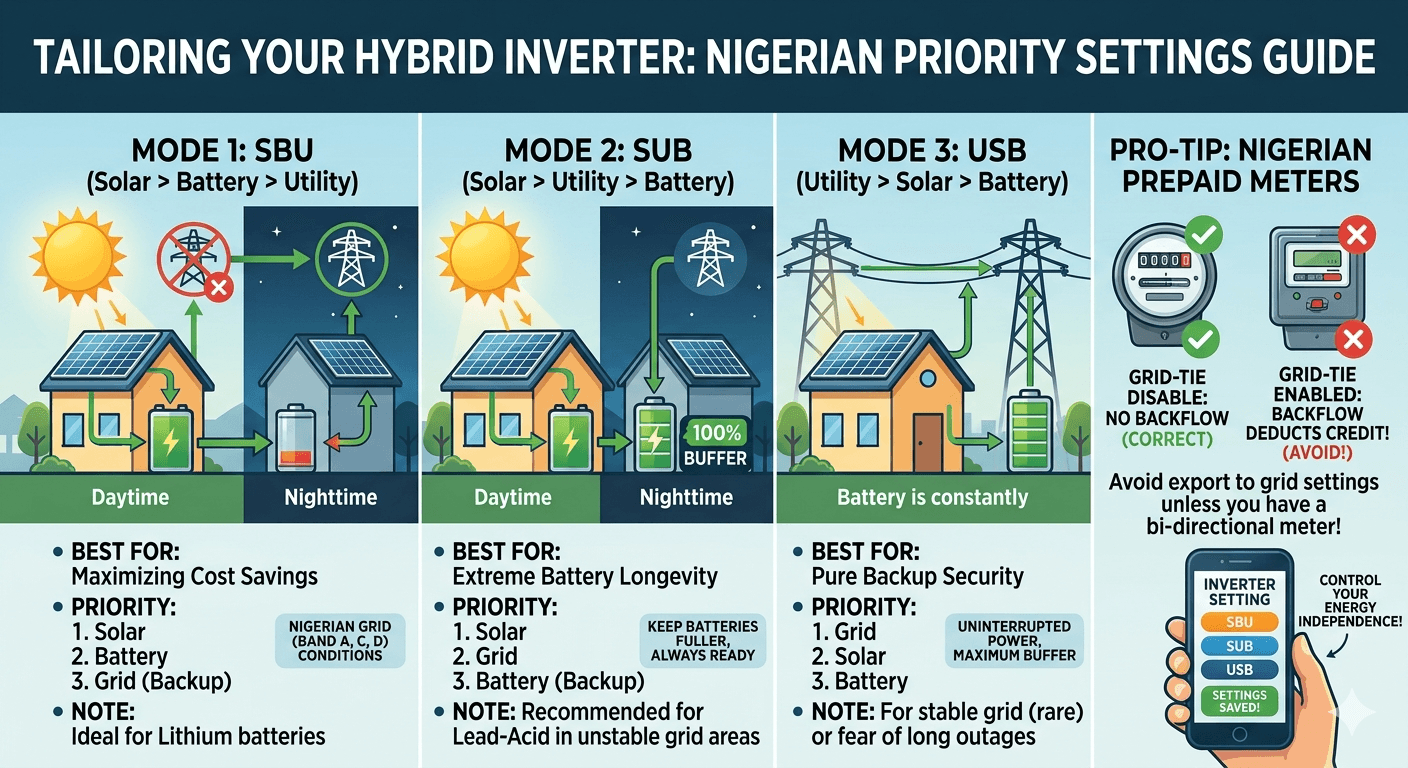
The Four Priority Modes Explained
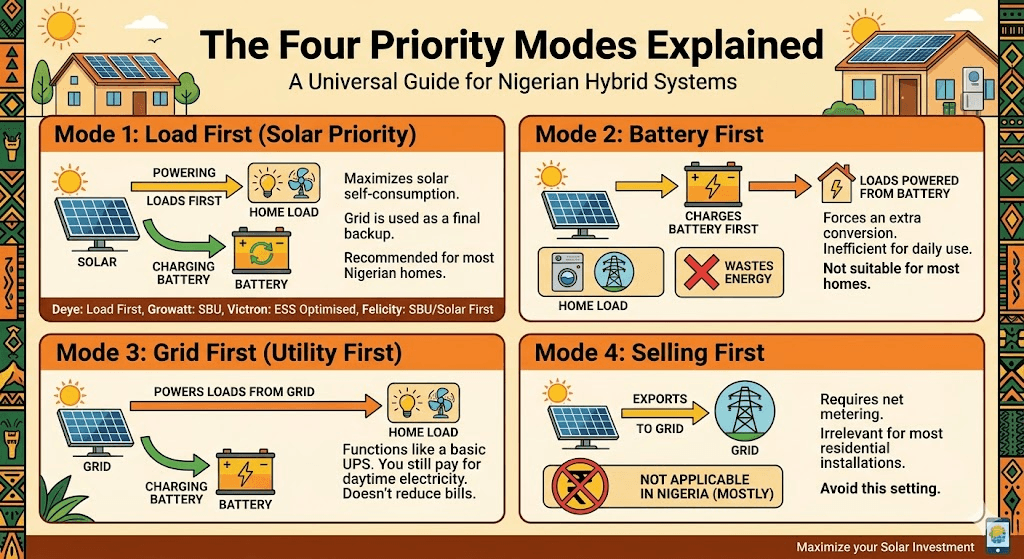
Different brands use different names for the same concepts. Here is the universal explanation of each mode before we get to brand-specific settings.
Mode 1: Load First (Solar Priority)
The inverter uses solar to power your loads first. Any solar surplus beyond what the loads need goes to charge the battery. When the battery is full and solar still exceeds load demand, the MPPT clips the array or exports to the grid if Solar Sell is enabled.
At night or when solar is insufficient, the battery discharges to cover loads. When the battery hits the low SOC threshold, the grid takes over.
This is the correct mode for most Nigerian hybrid systems. It maximises solar self-consumption, keeps the battery cycling within its designed parameters, and uses the grid only when both solar and battery are exhausted.
On Deye: Load First under Energy Pattern On Growatt: SBU (Solar-Battery-Utility) priority On Victron: ESS Optimised mode On Felicity: Solar First or SBU mode
Mode 2: Battery First
The inverter charges the battery first from solar before powering loads. Loads are powered from the battery, not directly from solar.
This mode wastes energy because it routes solar through an extra conversion (solar to battery, then battery to loads) instead of powering loads directly from solar. Round-trip battery efficiency is 97% for DC-coupled LiFePO4. That 3% loss happens every cycle, every day.
Battery First is the wrong mode for most Nigerian homes. The only scenario where it makes sense is if you need a guaranteed full battery for a long overnight period and your solar production is marginal relative to your daytime load.
Mode 3: Grid First (Utility First)
The inverter powers your loads from the grid first. Solar charges the battery. Battery only used during grid failure.
This mode makes the hybrid system behave like a basic UPS. You get backup during grid failure but you are importing grid power constantly during the day while solar production is available. Your electricity bill is not reduced.
Grid First is the wrong mode for Nigerian homes unless you are deliberately staging a daytime grid import and battery charge to maximise overnight backup. Even then, Load First with a grid charge window configured in TOU achieves this more intelligently.
Mode 4: Selling First
The inverter exports maximum solar to the grid. In Nigeria, most DISCOs do not offer net metering at residential scale. Selling First is therefore irrelevant for most Nigerian residential installations. Do not enable this mode unless your DISCO has explicitly confirmed net metering is available at your connection point.
Deye Hybrid Inverter Priority Settings

Deye is the most widely deployed hybrid brand in Nigeria. The settings interface uses terminology that confuses most installers. Here is exactly what to configure.
Step 1: System Work Mode

Go to: System Setup > System Work Mode
For a Nigerian home without net metering:
- Zero Export to CT: Check this. It prevents the inverter from feeding power backwards through your main distribution board into the NEPA network. Requires a CT installed at the grid connection point.
- Zero Export to Load: Use this only if you have no CT installed. Less precise than CT-based zero export.
- Solar Sell: Leave unchecked. Nigeria does not have residential net metering at scale. Enabling this without a net metering agreement means you are feeding power to the grid for free.
Step 2: Energy Pattern
Go to: System Work Mode > Energy Pattern
Select: Load First
This means PV powers your loads first, then charges the battery with surplus. If PV is insufficient, the battery supplements. If battery hits the low SOC threshold, the grid takes over.
Do not select Battery First. Do not select Selling First for a Nigerian home without net metering.
Step 3: Time of Use Settings

Go to: System Work Mode > Time of Use
Check the Time of Use checkbox to enable it. This is critical. On Deye, if Time of Use is not enabled, the battery will not discharge to power loads when the grid is present. The battery stays at 100% and the grid powers everything.
CRITICAL: If Time of Use is not enabled on Deye, the battery will not discharge when grid is present. Result: Battery sits at 100% all day. Grid powers all loads. You have paid N1.65m to N2.65m for a battery that never works. Fix: Enable Time of Use. Set SOC target to 20% for all periods where battery discharge is desired.
| Time Period | SOC Target | Grid Charge |
| 00:00 to 06:00 | 20% | Unchecked (unless TOU charging wanted) |
| 06:00 to 18:00 | 20% | Unchecked |
| 18:00 to 24:00 | 20% | Unchecked |
The SOC value in the TOU table is the minimum SOC the battery will discharge to during that period. Setting it to 20% means the battery discharges down to 20% SOC before handing over to the grid.
Step 4: Battery Settings

Go to: System Setup > Battery Setup
- Battery Mode: Lithium
- Max A Charge: Set to 50% of your battery Ah rating. For a 200Ah battery, set to 100A.
- Max A Discharge: Set to match your battery BMS DCL. For 200Ah LiFePO4, typically 100A to 150A.
- Shutdown: 10% SOC
- Low Batt: 20% SOC
- Restart: 30% SOC
- Grid Charge: Unchecked (unless off-peak grid charging is specifically wanted)
Step 5: Verify BMS Communication
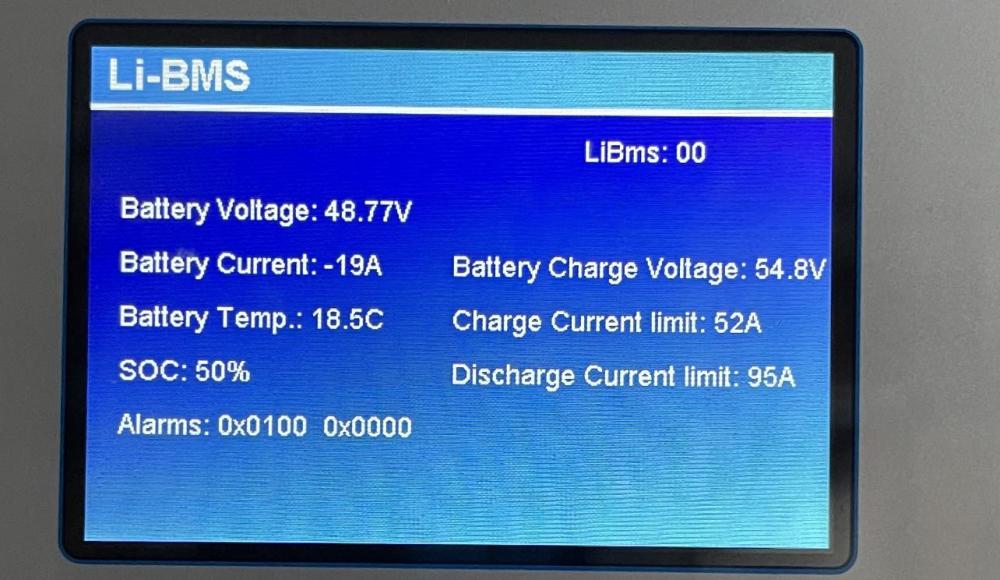
Go to: System Setup > Li-Batt Info
If BMS communication is active, you will see real-time cell voltages, BMS temperature, and SOC from the BMS. If this page shows no data or shows voltage-estimated SOC, BMS communication is not working. Do not close the installation until BMS communication is confirmed active.
Growatt SPH Priority Settings
Growatt SPH uses slightly different terminology from Deye but the logic is identical.
Output Source Priority
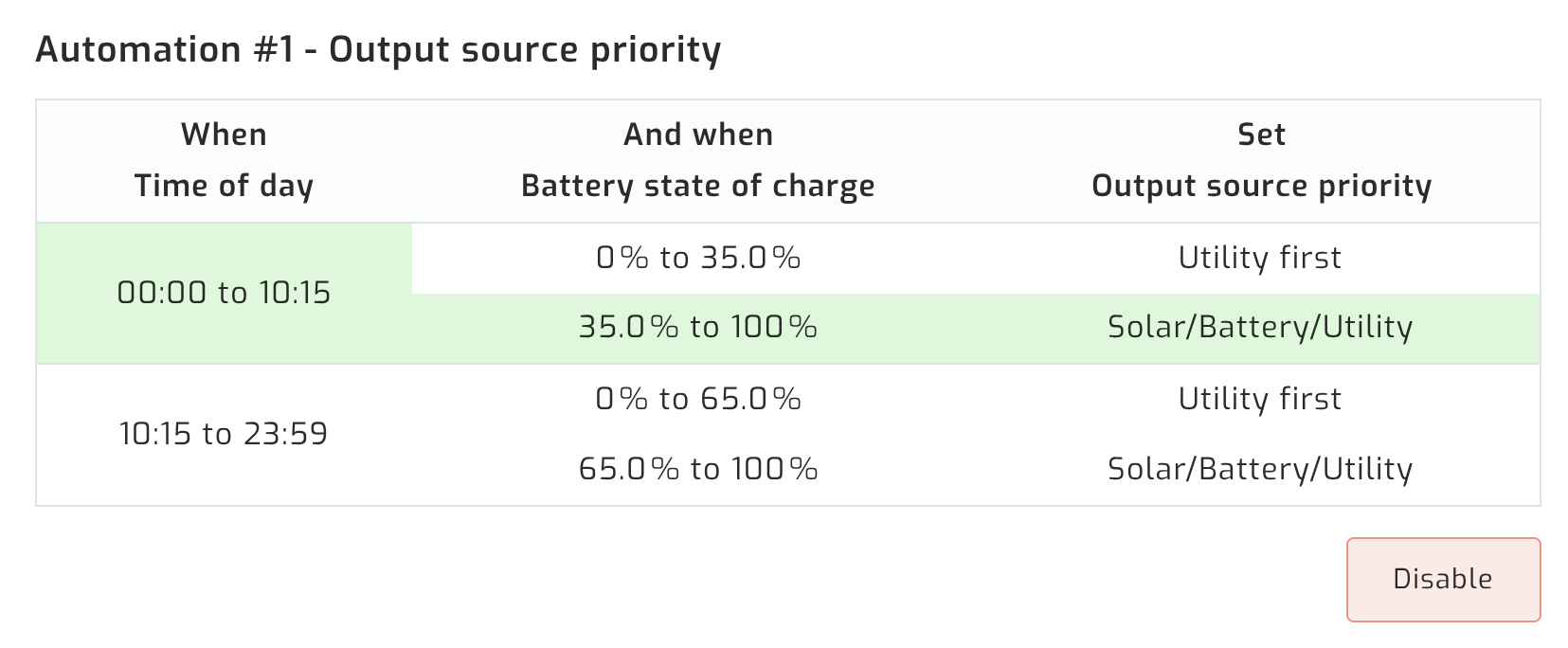
Go to: Settings > Output Source Priority
Select: SBU (Solar-Battery-Utility)
This is the equivalent of Deye’s Load First plus battery discharge before grid. The inverter uses solar first, then battery, then utility grid.
| Mode | Power Flow | Use for Nigeria |
| SUB (Solar-Utility-Battery) | Solar first, then grid, then battery | Wrong: grid pays before battery |
| SBU (Solar-Battery-Utility) | Solar first, then battery, then grid | Correct for Nigerian conditions |
| UTI (Utility First) | Grid powers loads first | Wrong for day-to-day operation |
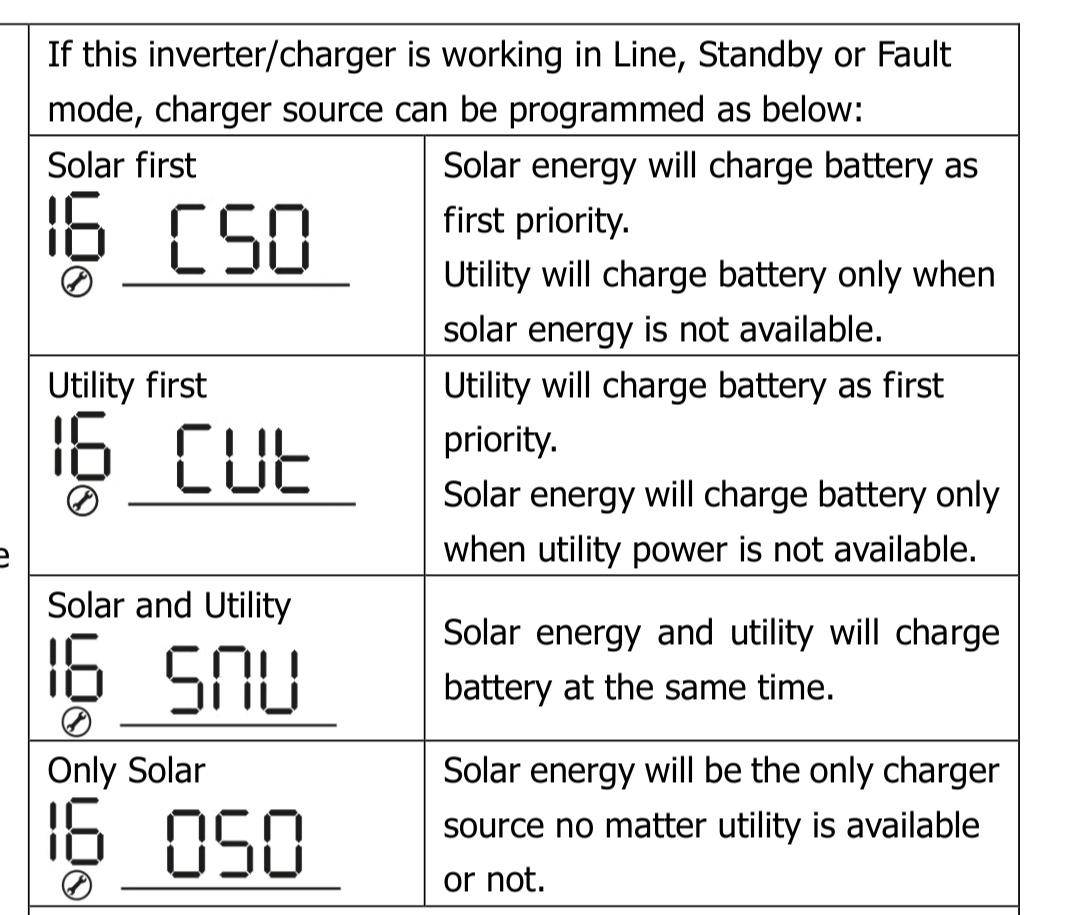
Charger Source Priority
Go to: Settings > Charger Source Priority
Select: Solar First
Solar charges the battery. Grid does not charge the battery unless solar is insufficient and grid charging is enabled. For most Nigerian installations, solar-only charging is correct.
Battery Cut-off Voltage
Go to: Settings > Battery Cut-off Voltage (Low DC Cut-off)
For a 48V LiFePO4 system, set to: 44.0V to 46.0V
This is the voltage at which the inverter stops discharging the battery and switches to grid. It corresponds to approximately 15 to 20% SOC for LiFePO4. Do not set this below 44.0V.
Back to Grid Voltage (Recharge Voltage)
.JPG)
Set to: 52.0V to 54.0V
This is the battery voltage at which the inverter switches back from grid to battery. For LiFePO4 at 48V, 52.0V corresponds to approximately 30 to 40% SOC. This gives the battery room to recharge from solar before discharging again.
Victron Multiplus-II Priority Settings
Victron’s priority configuration is done through VEConfigure software and the ESS (Energy Storage System) assistant, not through a simple menu. This is more complex but also more powerful.
Step 1: Install the ESS Assistant
Using VEConfigure (via MK3-USB interface):
- Open VEConfigure and connect to the Multiplus-II
- Go to the Assistants tab
- Add the ESS Assistant
- Run through the ESS configuration wizard
The ESS Assistant is what enables the Multiplus-II to function as a true hybrid inverter. Without it, the Multiplus operates as a basic inverter-charger with no grid management logic.
Step 2: Set the ESS Mode
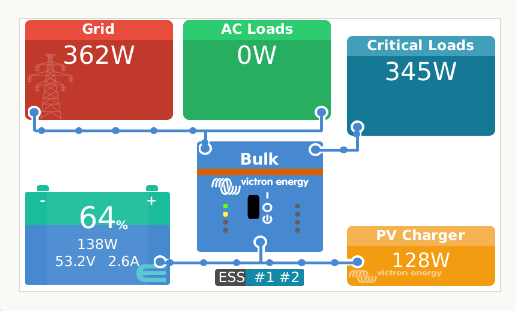
In the GX device (Cerbo GX or Venus GX): Go to Settings > ESS
Select: Optimised (with BatteryLife)
This is the equivalent of Load First on Deye and SBU on Growatt. For LiFePO4 specifically, disable BatteryLife and set a fixed minimum SOC instead, because LiFePO4 does not benefit from BatteryLife top-of-charge management in the same way as lead-acid.
Step 3: Set Minimum SOC
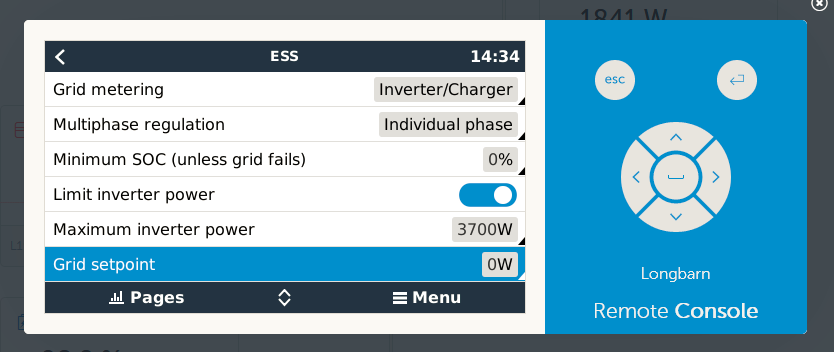
In the GX device: Go to Settings > ESS > Minimum SOC
Set to: 20%
The Multiplus will discharge the battery to 20% SOC before drawing from the grid. Below 20%, the grid takes over and the battery is protected.
Step 4: Grid Setpoint
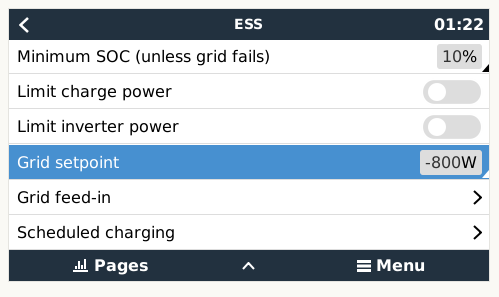
Go to: Settings > ESS > Grid Setpoint
Set to: 50W
This tells the system to always maintain a small grid import of 50W when grid is available. This prevents accidental export to the grid and provides a small buffer against sudden load spikes.
Step 5: AC Input Current Limit
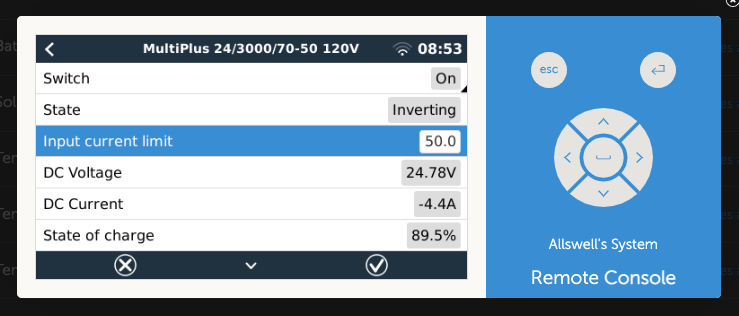
In VEConfigure: Go to Inverter/Charger > AC Input > Current Limit
Set this to the lower of: your NEPA meter ampere rating or your generator’s rated current output. For most Nigerian residential meters (5kVA NEPA meter at 230V): maximum 21.7A. Set to 20A.
Read our full guide on inverter-battery communication protocols for the Victron CAN bus configuration that must be completed alongside these ESS settings.
Felicity Hybrid Inverter Priority Settings

Felicity hybrid inverters use a menu structure similar to Growatt.
Output Priority
Select: SBU (Solar-Battery-Utility)
Same as Growatt. Solar powers loads first. Battery supplements when solar is insufficient. Grid takes over when battery hits cut-off.
Charging Priority
Select: Solar Priority
Solar charges the battery. Grid does not charge unless solar is absent and grid charging is specifically enabled.
Battery Low Voltage Cut-off
Set to: 44.0V to 46.0V for 48V LiFePO4.
Battery Type
Set to: LiFePO4 or Lithium
Do not leave this on the default setting (often AGM or Sealed Lead-Acid). The charge voltage profile for LiFePO4 is different from lead-acid. Running a LiFePO4 battery on a lead-acid charge profile applies incorrect charge voltages and will damage the battery within months.
The Most Common Priority Configuration Mistakes in Nigeria
These are the five mistakes that appear most frequently in Nigerian hybrid systems.
Mistake 1: Time of Use Not Enabled on Deye
Result: Battery never discharges when grid is present. Battery sits at 100% indefinitely. Grid powers all loads. The owner paid for a hybrid system and got a standby inverter.
Fix: Enable Time of Use. Set SOC target to 20% for all periods where battery discharge is desired.
Mistake 2: Output Priority Set to Utility First
Result: Grid powers all loads during the day. Solar only charges the battery. Generator or NEPA consumption is not reduced at all during daylight hours. No fuel saving.
Fix: Set to SBU or Load First. Solar powers loads directly. Grid is last resort.
Mistake 3: Battery Cut-off Voltage Set to 0% SOC or 40V
Result: Battery regularly discharges to near-zero. LiFePO4 cells go below 2.5V per cell. Cell degradation accelerates. Battery loses 30 to 40% of its capacity within 18 months.
Fix: Set discharge cut-off to 44V minimum (48V LiFePO4) or 20% SOC if BMS communication is active.
Read our article on the 80/20 rule for lithium batteries to understand why this single setting is the most important protection your battery has.
Mistake 4: Grid Charge Enabled With No Off-Peak Schedule
Result: Grid charges the battery all day and all night. You are paying NEPA rates to charge a battery that solar should be charging for free. Grid consumption is higher than before the solar installation.
Fix: Disable Grid Charge unless you have specifically configured a TOU grid charge window for off-peak hours only.
Mistake 5: Battery Type Left on Default (AGM or Lead-Acid Profile)
Result: Charge voltage is set to lead-acid parameters. Lead-acid float at 54.4V is applied to a LiFePO4 bank that should never be floated. Sustained float voltage at 54.4V accelerates lithium iron phosphate calendar aging significantly.
Fix: Set battery type to LiFePO4 or Lithium. Verify charge voltage limit matches your battery CVL specification.
Read our guide on CVL, CCL, and DCL dynamic battery limits to understand exactly what charge voltage parameters your battery BMS is sending to the inverter.
The Correct Priority Configuration for Nigerian Conditions
This is the recommended configuration summary for a Nigerian hybrid system with LiFePO4 battery and no net metering.
| Setting | Deye | Growatt | Victron | Felicity |
| Work mode / Output priority | Load First | SBU | ESS Optimised | SBU |
| Energy export | Zero Export to CT, Solar Sell OFF | Solar Sell OFF | Grid Setpoint 50W | Solar Sell OFF |
| Battery discharge trigger | TOU enabled, SOC 20% | SBU automatic | Min SOC 20% | SBU automatic |
| Battery cut-off | Low Batt 20%, Shutdown 10% | Cut-off 44V to 46V | Min SOC 20% | Cut-off 44V to 46V |
| Battery type setting | Lithium | LiFePO4 | Via BMS comms | LiFePO4 |
| Grid charge | Unchecked | Solar Priority | Grid Setpoint only | Solar Priority |
| Float charging | BMS-managed, disable manual float | Disabled | Disabled via BMS | Disabled |
For the full system design context behind these settings, read our complete hybrid solar system design guide.
For everything on what happens when BMS communication is configured correctly versus incorrectly, read our guide on inverter-battery communication protocols and our article on why most solar battery systems fail before year 2.
Frequently Asked Questions

What is the best priority setting for a hybrid inverter in Nigeria?
For a Nigerian home with partial DISCO supply and no net metering: Load First on Deye, SBU on Growatt and Felicity, ESS Optimised on Victron. This configuration uses solar to power loads first, stores surplus in the battery, and draws from the grid only when the battery reaches 20% SOC. It maximises solar self-consumption, minimises grid import, and protects the battery from deep discharge.
Why is my Deye inverter using grid power even when the battery is full?
The most common cause is Time of Use not being enabled. On Deye, even with Load First selected, the battery will not discharge to power loads when the grid is present unless Time of Use is checked and active with an appropriate SOC target. Enable Time of Use. Set the SOC target to 20% for all periods where you want battery discharge.
What is the difference between Load First and Battery First on a hybrid inverter?
Load First means solar powers your loads directly first, then charges the battery with surplus. Battery First means solar charges the battery first, then powers loads from the battery. Load First is more efficient because it avoids the round-trip conversion loss of routing solar through the battery unnecessarily. For Nigerian conditions, Load First is correct in almost every scenario.
Should I enable Solar Sell on my Deye or Growatt inverter in Nigeria?
No, for most Nigerian residential installations. Nigeria does not currently have functional net metering for residential customers below 50kWp. Enabling Solar Sell without a net metering agreement means you are feeding power to the grid for free. Leave Solar Sell unchecked and enable Zero Export to CT to prevent accidental grid export.
What should my battery cut-off voltage be for LiFePO4?
For a 48V LiFePO4 system, set the discharge cut-off voltage to 44.0V to 46.0V. This corresponds to approximately 10 to 20% SOC. If your inverter supports SOC-based cut-off with active BMS communication, set to 20% SOC directly. Never set the cut-off to 40V or below. Taking LiFePO4 below 44V regularly destroys the battery within 18 months.
Why is my hybrid system charging the battery from the grid during the day?
Grid Charge is enabled. This setting tells the inverter to charge the battery from the grid regardless of solar availability. For Nigerian daytime operation, Grid Charge should be disabled. You want solar to charge the battery during the day, not grid power. If you want grid charging, configure it only for specific off-peak night hours using TOU scheduling.
How do I prevent my hybrid inverter from exporting power to the NEPA grid?
On Deye: enable Zero Export to CT and leave Solar Sell unchecked. On Growatt: leave Solar Sell disabled and set Output Priority to SBU. On Victron: set Grid Setpoint to 50W which maintains a small import and prevents export. On Felicity: disable grid sell mode. All of these configurations prevent the inverter from pushing power backwards onto the NEPA line.
Conclusion
Priority settings are not a set-and-forget choice at installation. They are the operating instructions for your entire energy system. Wrong settings mean wrong behaviour every second of every day: wasted solar generation, unnecessary grid import, and premature battery degradation.
For Nigerian hybrid systems the correct configuration is consistent across all brands: solar powers loads first, battery provides backup down to 20% SOC, grid is the last resort. Time of Use must be enabled on Deye. SBU mode must be selected on Growatt and Felicity. ESS Optimised must be configured on Victron.
Every parameter in this article is verifiable on your inverter display or monitoring app. If your system is not behaving as described, start with the settings in this article and work through each brand’s checklist.
A hybrid system configured correctly earns its price every single day. One configured incorrectly is an expensive grid-dependent UPS.

I am Engr. Ubokobong Ekpenyong, a solar specialist and lithium battery systems engineer with over five years of hands-on experience designing, assembling, and commissioning off-grid solar and energy storage systems. My work focuses on lithium battery pack architecture, BMS configuration, and system reliability in off-grid and high-demand environments.